Pages

Monday, April 11, 2016

Cygwin linking library problem on windows systems

Have you ever faced problem in compiling the Cygwin on windows? have you ever faced problem in resolving error: ld returned 1 exit status? Then here is the solution.

Even i have faced this, i have googled a lot to solve this issue but i couldn't find solution from any site. With my previous debugging skills finally i am able to resolve this issue. So i thought it is worthwhile to share with others.

For example you want to include static libraries, files will be created either .a or .lib extension, created in windows directory c:\xxx\yyy\zzz\test.a (full path).

You might have tried below compiler configuration
Library Path (-L): c:\xxx\yyy\zzz
Libraries (-l): test.a

For this definitely you will get error: ld returned 1 exit status. Do you know why? compiler will be reading your configuration as c:\xxx\yyy\zzz\libtest.a.a. In reality this path and file doesn't exist.

Then how to set the path for external library include?
As i have seen, compiler always looks for lib directory in the library path for your file. So you can do it in two ways.

1. create lib folder to keep your test.a in c:\xxx\yyy\zzz directory (i.e c:\xxx\yyy\zzz\lib\test.a). Then use below configuration
Library Path (-L): c:\xxx\yyy\zzz
Libraries (-l): \test

So compiler will be resolved this as c:\xxx\yyy\zzz\lib\test.a. if the file doesn't exist then it will try to lookin c:\xxx\yyy\zzz\lib\test.lib file.

2. If you don't want create lib folder then give relative path to your library file. Use below configuration
Library Path (-L): c:\xxx\yyy\zzz
Libraries (-l): \..\test

So compiler will be resolved this as c:\xxx\yyy\zzz\lib\..\test.a which means c:\xxx\yyy\zzz\lib\test.a. if the file doesn't exist then it will try to lookin c:\xxx\yyy\zzz\lib\..\test.lib file.

Let me know your experience on this library include solution for cygwin on windows.

Sunday, February 28, 2016

JAVA JDK installation on UBUNTU OS on Beaglebone Black [BBB]

This time i have tried installing JAVA JDK on UBUNTU OS which is running on Beagle Bone Black [BBB]. Installation is pretty much simple but the right selection of JAVA JDK variant (architecture) is very much important. In this process, i have tried installing various version of JAVA JDKs but i have succeeded only in one variant of JDK. i.e. ejre-7u45-fcs-b15-linux-arm-vfp-hflt-server_headless-26_sep_2013.tar.gz Download and installation steps are provided below.

Download

Go to Oracle website and download the variant ejre-7u45-fcs-b15-linux-arm-vfp-hflt-server_headless-26_sep_2013.tar.gz. Make sure that you are agreeing the oracle terms and condition to download the software.

Install

Copy the files to the directory where you want to keep the java file. In my case i have copied the files into /opt/.

Some times installation requires root privileges, So login as root user otherwise use sudo before the each command execution.

Create directory as jdk in /opt/ directory

mkdir /opt/jdk

Extract the compressed file into the targeted directory

tar -zxvf ejre-7u45-fcs-b15-linux-arm-vfp-hflt-server_headless-26_sep_2013.tar.gz -C /opt/jdk

Verify the extract location

ls /opt/jdk


Environment Settings

This has to be done to tell the OS to point java execution to extracted directory.

Edit the file to add the java installation path (root privileges required).

nano /etc/profile

Add below lines of code into the file and save.

export JAVA_HOME=/opt/jdk/ejre1.7.0_45
export PATH=$PATH:/opt/jdk/ejre1.7.0_45/bin

Save it by pressing shortcut keys.

Ctrl+x
y
Enter

Verify

Execute this command in any terminal. it should returns the version of the java installed.

java -version

Output will be

java version "1.7.0_45"
Java(TM) SE Embedded Runtime Environment (build 1.7.0_45-b15, headless)
Java HotSpot(TM) Embedded Server VM (build 24.45-b08, mixed mode)


Troubleshoot

If you get the error as java command not found then the environment setting is not properly done.

If you get the error as no such file or directory then the selection of JAVA is not correct. Revisit the java variants supported for your OS and Hardware.


Tuesday, February 9, 2016

New journey in the world with IoT(Internet of Things)

The Internet of Things (IoT) is the network of physical objects—devices, vehicles, buildings and other items which are embedded with electronics, software, sensors, and network connectivity, which enables these objects to collect and exchange data (Ref. wiki).

In simple terms, small embedded controller(IoT) can be controlled or monitored over internet. For ex. you can log the your room temperature into the server and it can be view-able anywhere in the world. Similarly, you can turn on/off your room light from anywhere in the world with the help internet.

The whole world is already jumped into the concept of IoTs and giving lot of flexibility in developing programs to create solutions for world hunger problem. The big companies like google, matlab, cisco, microsoft, sap, GE and many other are provided platform already to build solutions.

As a curious embedded programmer i have started developing my first IoT device to monitor my room temperature over the internet. I have used below components/services for my application,
1) Arduino uno - Development kit
2) ESP8266 - Wifi module
3) https://thingspeak.com/ - IoT server
4) B57703M0103G040 - NTC sensor
5) My mobile as wifi hotspot with my GPRS service
6) some resistors and connecting wire.

I will share my thoughts and experience in futures posts. Stay tuned for it.

Monday, March 23, 2015

Excel based tool for timing diagram

Hi Folks, Today I came across a problem in plotting timing diagram based on the timers and the triggering instances. So i thought of creating excel macro based tool to solve this specific type of the requirement...

This tool helps in creating timing waveform based on the the values in the excel cell. Beauty of this tool is it can plot N number of triggers with N numbers of timers in one group. Also you can have multiple diagrams on a single sheet.

Here i have attached the Excel macro based tool with the WebEx recorders for its usage. Drop comments if you find it is useful.


WebEx demo
Excel tool.
useful video on timing diagram creation on excel

Tuesday, January 22, 2013

Micromax A116 is better than A110

Micromax launched a new smartphone A116 Canvas HD with Android 4.1 (Jelly Bean) and powered by a 1.2 GHz quad-core processor, the company’s first quad-core processor smartphone (As the world's first commercialized quad-core Cortex-A7 SoC).


Micromax A116 Canvas HD Specs
  • 5-inch (1280 x 720 pixels) HD IPS display, colour depth of 16.7 million
  • 1.2 GHz quad-core MediaTek MT6589 processor
  • Dual Sim
  • 1GB RAM
  • 4GB internal memory
  • Expandable up to 32GB
  • 8-megapixel rear camera, LED flash and 4X zoom
  • VGA front camera
  • 2100 mAh battery
  • Android 4.1 JellyBean (up-gradable to 4.2)
  • 3G, WiFi 802.11 b/g/n, Bluetooth, GPS/A-GPS
  • 3.5mm audio jack

The price of the smartphone is expected to be below Rs 15,000, and it will be available in India from the first week of February 2013.

Video Review

Monday, November 5, 2012

SMpool - Study Material Pool


Hi all,

we have created new public website http://SMpool.com . to provide free service for everyone to Share - Search - Download any study material.. I need all of your support and encouragement to reach one who needs it..

Also it has free webhosting service with many free features. To know more about thease, please visit below links

Show your Encouragement by subscribing to below social networks,


Tuesday, October 23, 2012

C# code for ADFLY API and it works for similar services

Do you want program to create dynamic short url from your application?? Then here is the class file written in C# programming language. This is very simple code and any one can modify and reuse this code. Also enhancement are appreciated if you have done on top of this code. This is specifically written and tested for adf.ly short url service. Just by modifying APP_ID and USERID you can use it for your url shortner account.

Here i provided full class file written in C#.NET technology. Below this class program, i have provided how to call this class. Calling this service is pretty much simpler and just two line needed. Use GenerateShortUrl function under try catch block, you can see any error occurred in class file as an exception; otherwise you will get short url successfully obtained from adf.ly website.

Code C#


using System.Net;
using System.IO;

 public class UrlShortService
    {
        private string _APIKEY;
        private string _UID;
        public enum AdvertType {Banner, FullPage};
        public enum Domain {Adf_ly,q_gs};
        private string  _AdvType;
        private string  _Domain;
        private string _UrlBaseAddress;
        private string _RequestURL;
        private string GetAdvType(AdvertType adv)
        {
            string tmpAdType;
            if (adv == AdvertType.FullPage)
                tmpAdType = "int";
            else
                tmpAdType = "banner";
            return tmpAdType;
        }
        public UrlShortService(string APPKEY, string UID, AdvertType AdvType, Domain DomainType)
        {
            _UrlBaseAddress = "http://api.adf.ly/api.php";
            _APIKEY = APPKEY;
            _UID = UID;
            _AdvType = GetAdvType(AdvType);
            _Domain = GetDomainName(DomainType);
            _RequestURL = string.Format("{0}?key={1}&uid={2}&advert_type={3}&domain={4}&url=", _UrlBaseAddress, _APIKEY, _UID, _AdvType, _Domain);
        }

        public UrlShortService(AdvertType AdvType)
        {
            _UrlBaseAddress = "http://api.adf.ly/api.php";
            _APIKEY = "1a01cb1aa861a0d11f293beba530e6a7"; //provide your appkey
            _UID = "2655514"; // provide your User ID
            _AdvType = GetAdvType(AdvType);
            _Domain = GetDomainName(Domain.Adf_ly);
            _RequestURL = string.Format("{0}?key={1}&uid={2}&advert_type={3}&domain={4}&url=", _UrlBaseAddress, _APIKEY, _UID, _AdvType, _Domain);
        }

        public UrlShortService()
        {
            _UrlBaseAddress = "http://api.adf.ly/api.php";
            _APIKEY = "1a01cb1aa861a0d11f293beba530e6a7";
            _UID = "2655514";
            _AdvType = GetAdvType(AdvertType.Banner);
            _Domain = GetDomainName(Domain.Adf_ly);
            _RequestURL = string.Format("{0}?key={1}&uid={2}&advert_type={3}&domain={4}&url=", _UrlBaseAddress, _APIKEY, _UID, _AdvType, _Domain);
        }

        
        public string GenerateShortUrl(string UrlName)
        {
            string Result;
            try
            {
                HttpWebRequest httpReq = (HttpWebRequest)HttpWebRequest.Create(_RequestURL+UrlName);
                HttpWebResponse httpResp = (HttpWebResponse)httpReq.GetResponse();

                Result = new StreamReader(httpResp.GetResponseStream()).ReadToEnd().Trim();

                if (Result.ToLower() == "error")
                {
                    throw new Exception("ShortUrl Response Error");
                }
            }
            catch (Exception err)
            {
                throw new Exception("ShortUrl Conversion Error: " + err.Message);
            }

            return Result;
        }        
        
        }

How to Use:


            UrlShortService urlshort = new UrlShortService();
            string ShortUrl = urlshort.GenerateShortUrl("http://intbuzz.blogspot.com");

ShortUrl contains value
 http://adf.ly/DxO9t

Please feel free to ask any doubts in your mind. Also provide comment if it is useful to you.

Wednesday, July 11, 2012

Ainol NOVO 7 ELF II Detailed Specification and Review

Ainol NOVO 7 ELF II Detailed Specification:

Model Name Ainol NOVO 7 ELF II
CPU Dual-Core ARM Cortex-A9 based AMLogic 8726-M6 1.5GHz
GPU Dual Core Mali-400 x 2
Operating System Google Android 4.0.3 ICS
Display 7.0 inch Capacitive Multi-touch Screen(5 Points)
1024 x 600 (16 : 9) pixels high resolution LCD
RAM 1GB DDR3 RAM
Internal Memory Built in 8GB Memory (Android System consumes about 2.2GB)
External TF Card Supported upto 32 GB
Camera 2.0MP Front Facing
Bluetooth No
GPS No
WiFi Support WIFI 802.1 b/g/n
Gravity Senser Built-in 3D gravity sensor, super sensitive.
Flash Support Flash 10.2 (Adobe designed for Amlogic)
Battery 3700 mAh
I/O Ports 1 x TF Card Slot
1 x mini HDMI 1.4
1 x mini USB OTG
1 x Mic
1 x Speaker
1 x Power Input
1 x 3.5 mm Jack
1 x Home Button
1 x Volume +/- Button
1 x Power Button
1 x 2.0 MP Camera
Dimention 189.3 x 120 x 11.2 mm,  330g
Video Format WMV / ASF / MP4 / AVI / MPG / RV10 / DivX / VC-1 / MPEG-2 / MPEG-4 / H.263 / H.264 / 3GP / 3G2M4V / etc…
Audio Format MP3 / WMA / WAV / MIDI / AAC / AAC+ / eAAC+ / AMR-NB / AMR-WB / QCP / M4A / etc...
Photo Format JPG / GIF / BMP / PNG / etc...
Office Format Word / Excel / PDF / Power Point / TXT / ePub / etc...
Android Market Yes, In the name of MID ELF II
USB OTG Keyboard, USB, LAN, Laptop/Desktop
3G Dongle HUAWEI E1750
HUAWEI E1916
HUAWEI E261
HUAWEI E353
HUAWEI EC122
HUAWEI EC1261
HUAWEI EC150
HUAWEI EC156
HUAWEI EC167
HUAWEI EC189
HUAWEI EM770W
ZTE AC2736
ZTE MF110
ZTE MF190

Useful Links:
Read androidbox review
Ainol India website

Ainol NOVO 7 ELF II is a Best Choice in Current Tablet PC Market


When i was searching for alternative tablets to beelabz, i came to know that, our money should be worthier for next few years technology. It should have some good hardware specification so that i can easily upgrade latest android OS to experience its latest features in my tablet itself..

I feel there are two good alternatives tablets exist in this market. One is Manufactured by Google and another is from Ainol NOVO. Google arrival to India might be delayed, may be this year end or beginning of next year and also it has its own drawbacks.. So Ainol novo is left in my option.

Shenzhen Ainol Electronics Co (Ltd) is a Chinese consumer electronics manufacturer and distribution company in Shenzhen, Guangdong province in China since 2004. In December 2011 Ainol launched the world's first Android 4.0 Ice Cream Sandwich tablet called NOVO7 and was marketed with the brand name Ainovo for the United States, Europe and worldwide market. Also they have open forums so that we can get help on any software or hardware issues.

There are several models available in NOVO 7 Series. Out of which i felt NOVO 7 ELF II and NOVO 7 Aurora II models are comes with good configuration. Both the models have same configuration except Display panels, ELF II comes with LCD Display and Aurora II comes with IPS Display panel. Cost wise also Aurora II is 3-4 thousand rupees more than ELF II. But for normal human eye cannot identify LCD display vs IPS panel display so quickly. Also, there no major difference between these two tablet.

After a lot of search and research done on almost all shopping sites and forums, i decided to go with NOVO 7 ELF II model. The next part of model selection is where to buy this model?? Product should be genuine and should be get it with lesser price, also seller should be good enough to understand our problems before and after order placement in their shop.. So finally i chose Trade Radius (now its ainol india official store) shop from Ebay, because i can get protection on my payment from ebay and he is a good seller and he has 100% positive feedback.

Finally, i placed order at Trade Radius (now its ainol india official store) ebay shop on July 2nd and got my tablet on 10th morning. This tablet is genuine AINOL NOVO 7 ELF II from China and shop owner has changed the default language from china to English for our quick access and not to worry about language change problem in first time use. I Dont have much time to explore this tablet so far. Till now i am happy about the performance, display, and interfacing support with external devices..

I am trying to explore much on this tablet. I will post more about this tablet soon on this blog.

Useful Links:
Ainol Novo Official Site (Chinese)
Ainol Novo Official Site (India)
Ainol Novo Official Forum
Ainol Novo Official Store
Shop ELF II @ AinolIndia Ebay Store

Read Detailed Specification and Review of ELF II tablet

Monday, July 9, 2012

INTBuzz is Switching to Power Saving Mode

Recently i came to know that we can save power by switching off the lights in monitors which are not going to help in reading. So I am also switching off lights in all our client systems, which greatly helps in saving power on earth.


This works pretty simple, but first we need to understand how LED/LCD monitors works.. In layman terms we can say, generally all monitors comes with thousand and thousand of LED/LCD bulbs arranged horizontally in many lines.. Usually 3 bulbs (Red, Blue, Green) are used to represent one pixel. When white color needs to be displayed then all 3 bulbs needs to be switched on, If we need black color then all bulbs needs to be switched off. By varying bulb voltages of all three bulbs provide different shades of color.

So in this blog we are switching off many of the monitors bulbs which doesn't provide any useful information (like background) and we will switch on only few bulbs which are going to provide some useful information. In this way I am going to support GO GREEN by switching off monitor lights at my blog viewer end.

Please spread this with your friends and family to save energy on earth.. :) :)

Read Few Articles on Net: 

Monday, July 2, 2012

Beware of missed call to check SIM cloning

If you have the habit of replaying to all missed calls, then think twice before you proceed. To know more what could happen, read this article from Times-of-India.

Next time if you get a missed call starting with +92; #90 or #09, don't show the courtesy of calling back because chances are it would lead to your SIM card being cloned. The telecom service providers are now issuing alerts to subscribers —particularly about the series mentioned above as the moment one press the call button after dialing the above number, someone at the other end will get your phone and SIM card cloned.

Source: http://timesofindia.indiatimes.com/tech/enterprise-it/security/Beware-of-missed-call-to-check-SIM-cloning/articleshow/14574073.cms

Sunday, July 1, 2012

Google Nexus 7 Official Release Specs & Features


Google announces first google tablet called as nexus 7 on june 27th 2012. Here is the official video of Nexus 7 tab and its specs. 
Performance
Processor
CPU: NVIDIA Tegra 3, Quad-Core, 1300MHz
GPU: NVIDIA  GeForce 12-core GPU
Operating system
Android v4.1 (Jelly Bean)
RAM
1 GB (1333 MHz)
Screen type
IPS
Screen resolution
1280 x 800 (WXGA)
Screen size
7"
Touch screen
Multi-touch
Screen features
IPS Panel with Gorilla Glass
Connectivity
Memory capacity
8GB/16 GB
Device interface
Micro USB
Wireless
802.11b/g/n Wi-Fi Direct
Bluetooth
Yes
GPS
Yes
External Ports
3.5 mm Headphone Jack
USB 2.0
micro USB
Features
Sound
3D Stereo Build-in
Camera
1.2 MP
Additional features
FHC Android Beam -Sensor, Light Sensor, 
Gyroscope,E-compass, GPS and Hall Sensor
Additional information
Accessories included
Power Adaptor
Battery
4325mAh, 16Wh Li-Polymer
Dimensions
Length x width x depth: 198.5 x 120 x 10.45 mm
Weight
340 g
Price
$199 (8GB) / $249 (16GB)
Drawbacks: No microSD card slot .Not possible to expand memory.. No HDMI output.. Not possible to connect to TV. No Rear Camera.. Not possible to take pictures No Flash.. Not possible to watch flash videos. You can pre-order from google playstore (currently not available to india). Read More about tablet specs from google official page Click Here

Friday, June 29, 2012

Android 4.1.x Jelly Bean Officially Released

Google announced the next Android version, 4.1 Jelly Bean on 27 June 2012. It is an incremental update with the main focus of improving the user interface, both in terms of functionality and performance, the latter involving "Project Butter" which uses touch anticipation, triple buffering, extended vsync timing and a fixed frame rate of 60fps to create a fluid and "buttery" smooth User Interface.
Jelly Bean - Android 4.1 OS


Jelly Bean user interface is largely the same as Ice Cream Sandwich, but now widgets will resize automatically when you drop them onto a crowded home page. Then, by moving the blue points you can make it smaller or change its shape.


Android 4.1 Jelly Bean includes these features with the existing Android 4.0.4 ICS


  • Vsync timing across all drawing and animation done by the Android framework, including application rendering, touch events, screen composition and display refresh
  • Triple buffering in the graphics pipeline
  • Enhanced accessibility
  • Bi-directional text and other language support
  • User-installable keyboard maps
  • Expandable notifications
  • Automatically resizable app widgets
  • Multichannel audio
  • Bluetooth data transfer for Android Beam
  • Offline voice dictation
  • Improved voice search
  • Improved camera app
  • High resolution contact photos
  • Google Now

Read Similar Article on Android: Android OS Naming in Different Releases

Saturday, June 23, 2012

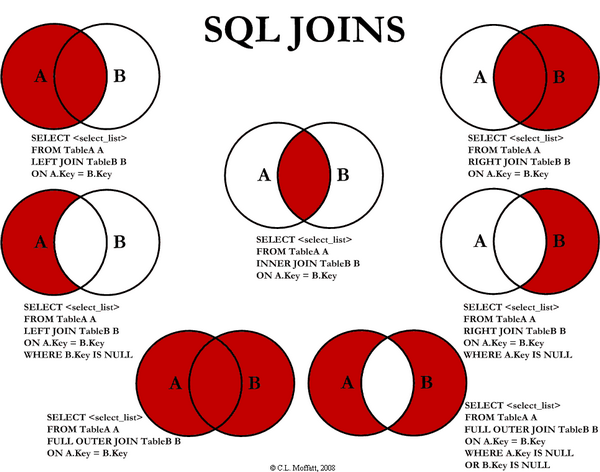
SQL JOINS

Nowadays SQL Joins are most commonly used SQL query to fetch data from different data tables. But most of us facing a problem in writing SQL joint queries. I found an interesting article on SQL Joins while Google-ing. This article author explains different SQL JOINS with the help of visual representation which is more easier than any theoretical explanation. Here i embedded that image. To read more about the article visit Visual Representation of SQL Joins


Tuesday, June 12, 2012

Android OS Naming in Different Releases


I dont know how many of you aware of android os naming convention. Common practice in all software industry is that they will provide different name for different releases of their product. Usually they will give different name for main releases (There is a major functionality changes on previous release) and not for patches. Likewise Android OS also named in different releases. Special here is Google using alphabetical order to name their android OS.


Here I listed table for android versions with its release name and release date.

Version
Release Name
Release date
Pre(1.0)*
Astro
Sep 28,2008
Pre(1.1)*
Bender
Feb 09,2009
1.5.x
Cupcake
Apr 30,2009
1.6.x
Donut
Sep 15,2009
2.0.x
Eclair
Oct 26,2009
2.2.x
Froyo
May 20,2010
2.3.x
Gingerbread
Dec 06,2010
3.x.x
Honeycomb
Feb 22,2011
4.0.x
Ice Cream Sandwich
Oct 19,2011
4.1.x
Jelly Bean
Jun 27, 2012

* The pre-release versions of Android were dubbed Astro and Bender, but these names could not ultimately be used for trademark reasons. But officially trademarked this as Android.

Wednesday, May 23, 2012

Easiest Way To Set Up Linux On Top Of Existing OS

Virtual Platform

VMplayer is software developed by vm-ware, provides virtual environment on top of any existing operating system. Virtual environment in the sense, the same physical hardware is shared to the operating system installed inside the VMPlayer (guest) with hiding existing operating system (host). So if anything happens inside the VMplayer will not affect main operating system where you installed VMplayer. This software is absolutely free of cost from vm-ware but you have to register an account at vm-ware to download the software.

Virtual Plat-Form VMplayer supports many guest operating systems on a single host operating system and keeps each guest OS files in a single file with extension vmdk on host machine. These vmdk files can be transferrable to any machine and can be reusable without having any configuration.
  
Trend sigma website offers free vmdk files for various linux operating systems. User can download any linux vmdk file from their site to use OS. This avoids manual installation effort for individuals.

Note: Virtualbox is open source software works similar to vmware.

Follow the Steps to Setup Linux
  1. Download VMPlayer from Vmware website.
  2. Install VM player on top of your existing windows OS.
  3. Download vmdk zip files for any Linux.
  4. Extract zip file and keep extracted file in permanent place.
  5. Open VMPlayer -> Click Open Virtual machine -> Browse extracted vmx file -> Click next to finish.
  6. Now virtual Linux is ready. Right Click on machine name from VMPlayer and click Play to start your new Linux.
  7. Provide login credential user/password and enjoy!!!

Useful Links

Friday, May 4, 2012

Samsung Galaxy S3 Hands On Review


Samsung Galaxy S3 official released in market on May 3, 2012. This is most awaited smartphone with android 4.0 from Samsung. I found interesting Hands on review of this smart phone on internet. So i embedded here to spread the video for Samsung lovers. :)


Galaxy S3 Specification
Network 
2.5G (GSM/ GPRS/ EDGE): 850 / 900 / 1800 / 1900 MHz
3G (HSPA 21Mbps): 850 / 900 / 1900 / 2100 MHz
4G (Dependent on market)
Display
4.8 inch HD Super AMOLED (1280×720) display
OS
Android 4.0 (Ice Cream Sandwich)
Camera
Main(Rear): 8 Mega pixel Auto Focus camera with Flash & Zero Shutter Lag, BSI
Sub (Front): 1.9 Mega pixel camera, HD recording @30fps with Zero Shutter Lag, BSI
Video
Codec: MPEG4, H.264, H.263, DivX, DivX3.11, VC-1, VP8, WMV7/8, Sorenson Spark
Recording & Playback: Full HD (1080p) 
Audio
Codec: MP3, AMR-NB/WB, AAC/AAC/eAAC, WMA, OGG, FLAC, AC-3, apt-X
Additional Featues
S Beam, Buddy photo share, Share shot
AllShare Play, AllShare Cast
Smart stay, Social tag, Group tag, Face zoom, Face slide show
Direct call, Smart alert, Tap to top, Camera quick access
Pop up play
S Voice
Burst shot & Best photo, Recording snapshot, HDR
Google™ Mobile Services
Google Search, Google Maps, Gmail, Google Latitude
Google Play Store, Google Play Books, Google Play Movies
Google Plus, YouTube, Google Talk,
Google Places, Google Navigation, Google Downloads
Connectivity
WiFi a/b/g/n, WiFi HT40
GPS/GLONASS
NFC
Bluetooth® 4.0(LE)
Sensor
Accelerometer, RGB light, Digital compass, Proximity, Gyro, Barometer
Memory
16/ 32GB User memory (64GB available soon) microSD slot (up to 64GB)
Dimension
136.6 x 70.6 x 8.6 mm, 133g
Battery
2,100 mAh