Pages

Sunday, July 1, 2012

Google Nexus 7 Official Release Specs & Features


Google announces first google tablet called as nexus 7 on june 27th 2012. Here is the official video of Nexus 7 tab and its specs. 
Performance
Processor
CPU: NVIDIA Tegra 3, Quad-Core, 1300MHz
GPU: NVIDIA  GeForce 12-core GPU
Operating system
Android v4.1 (Jelly Bean)
RAM
1 GB (1333 MHz)
Screen type
IPS
Screen resolution
1280 x 800 (WXGA)
Screen size
7"
Touch screen
Multi-touch
Screen features
IPS Panel with Gorilla Glass
Connectivity
Memory capacity
8GB/16 GB
Device interface
Micro USB
Wireless
802.11b/g/n Wi-Fi Direct
Bluetooth
Yes
GPS
Yes
External Ports
3.5 mm Headphone Jack
USB 2.0
micro USB
Features
Sound
3D Stereo Build-in
Camera
1.2 MP
Additional features
FHC Android Beam -Sensor, Light Sensor, 
Gyroscope,E-compass, GPS and Hall Sensor
Additional information
Accessories included
Power Adaptor
Battery
4325mAh, 16Wh Li-Polymer
Dimensions
Length x width x depth: 198.5 x 120 x 10.45 mm
Weight
340 g
Price
$199 (8GB) / $249 (16GB)
Drawbacks: No microSD card slot .Not possible to expand memory.. No HDMI output.. Not possible to connect to TV. No Rear Camera.. Not possible to take pictures No Flash.. Not possible to watch flash videos. You can pre-order from google playstore (currently not available to india). Read More about tablet specs from google official page Click Here

Friday, June 29, 2012

Android 4.1.x Jelly Bean Officially Released

Google announced the next Android version, 4.1 Jelly Bean on 27 June 2012. It is an incremental update with the main focus of improving the user interface, both in terms of functionality and performance, the latter involving "Project Butter" which uses touch anticipation, triple buffering, extended vsync timing and a fixed frame rate of 60fps to create a fluid and "buttery" smooth User Interface.
Jelly Bean - Android 4.1 OS


Jelly Bean user interface is largely the same as Ice Cream Sandwich, but now widgets will resize automatically when you drop them onto a crowded home page. Then, by moving the blue points you can make it smaller or change its shape.


Android 4.1 Jelly Bean includes these features with the existing Android 4.0.4 ICS


  • Vsync timing across all drawing and animation done by the Android framework, including application rendering, touch events, screen composition and display refresh
  • Triple buffering in the graphics pipeline
  • Enhanced accessibility
  • Bi-directional text and other language support
  • User-installable keyboard maps
  • Expandable notifications
  • Automatically resizable app widgets
  • Multichannel audio
  • Bluetooth data transfer for Android Beam
  • Offline voice dictation
  • Improved voice search
  • Improved camera app
  • High resolution contact photos
  • Google Now

Read Similar Article on Android: Android OS Naming in Different Releases

Saturday, June 23, 2012

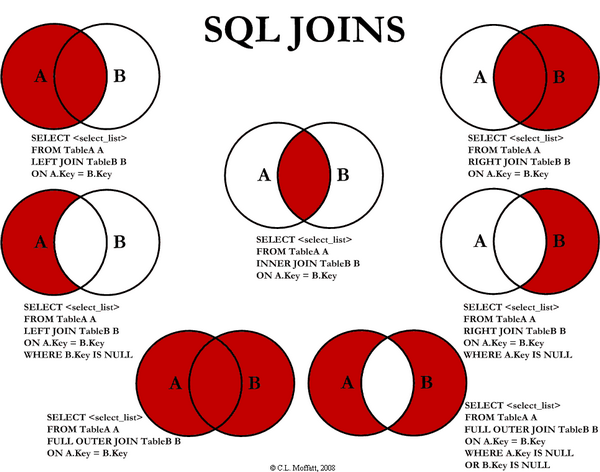
SQL JOINS

Nowadays SQL Joins are most commonly used SQL query to fetch data from different data tables. But most of us facing a problem in writing SQL joint queries. I found an interesting article on SQL Joins while Google-ing. This article author explains different SQL JOINS with the help of visual representation which is more easier than any theoretical explanation. Here i embedded that image. To read more about the article visit Visual Representation of SQL Joins


Tuesday, June 12, 2012

Android OS Naming in Different Releases


I dont know how many of you aware of android os naming convention. Common practice in all software industry is that they will provide different name for different releases of their product. Usually they will give different name for main releases (There is a major functionality changes on previous release) and not for patches. Likewise Android OS also named in different releases. Special here is Google using alphabetical order to name their android OS.


Here I listed table for android versions with its release name and release date.

Version
Release Name
Release date
Pre(1.0)*
Astro
Sep 28,2008
Pre(1.1)*
Bender
Feb 09,2009
1.5.x
Cupcake
Apr 30,2009
1.6.x
Donut
Sep 15,2009
2.0.x
Eclair
Oct 26,2009
2.2.x
Froyo
May 20,2010
2.3.x
Gingerbread
Dec 06,2010
3.x.x
Honeycomb
Feb 22,2011
4.0.x
Ice Cream Sandwich
Oct 19,2011
4.1.x
Jelly Bean
Jun 27, 2012

* The pre-release versions of Android were dubbed Astro and Bender, but these names could not ultimately be used for trademark reasons. But officially trademarked this as Android.

Wednesday, May 23, 2012

Easiest Way To Set Up Linux On Top Of Existing OS

Virtual Platform

VMplayer is software developed by vm-ware, provides virtual environment on top of any existing operating system. Virtual environment in the sense, the same physical hardware is shared to the operating system installed inside the VMPlayer (guest) with hiding existing operating system (host). So if anything happens inside the VMplayer will not affect main operating system where you installed VMplayer. This software is absolutely free of cost from vm-ware but you have to register an account at vm-ware to download the software.

Virtual Plat-Form VMplayer supports many guest operating systems on a single host operating system and keeps each guest OS files in a single file with extension vmdk on host machine. These vmdk files can be transferrable to any machine and can be reusable without having any configuration.
  
Trend sigma website offers free vmdk files for various linux operating systems. User can download any linux vmdk file from their site to use OS. This avoids manual installation effort for individuals.

Note: Virtualbox is open source software works similar to vmware.

Follow the Steps to Setup Linux
  1. Download VMPlayer from Vmware website.
  2. Install VM player on top of your existing windows OS.
  3. Download vmdk zip files for any Linux.
  4. Extract zip file and keep extracted file in permanent place.
  5. Open VMPlayer -> Click Open Virtual machine -> Browse extracted vmx file -> Click next to finish.
  6. Now virtual Linux is ready. Right Click on machine name from VMPlayer and click Play to start your new Linux.
  7. Provide login credential user/password and enjoy!!!

Useful Links